

You are running payroll for a handful of employees, and you keep landing on the same two names every time you search for a fix: Gusto and QuickBooks Payroll. Both platforms process pay, file taxes, and handle direct deposit, yet the decision between them changes your monthly bill and your day-to-day workload for years to come.
Gusto tends to win on HR features and employee experience, while QuickBooks Payroll wins on accounting integration, especially if you already run your books through QuickBooks Online.
That quick comparison is useful, but it will not reflect every business perfectly. The better choice depends on factors such as how many states your employees work in, whether QuickBooks already handles your bookkeeping, and how much value you place on having HR tools and support included within your payroll platform.
Key Takeaways
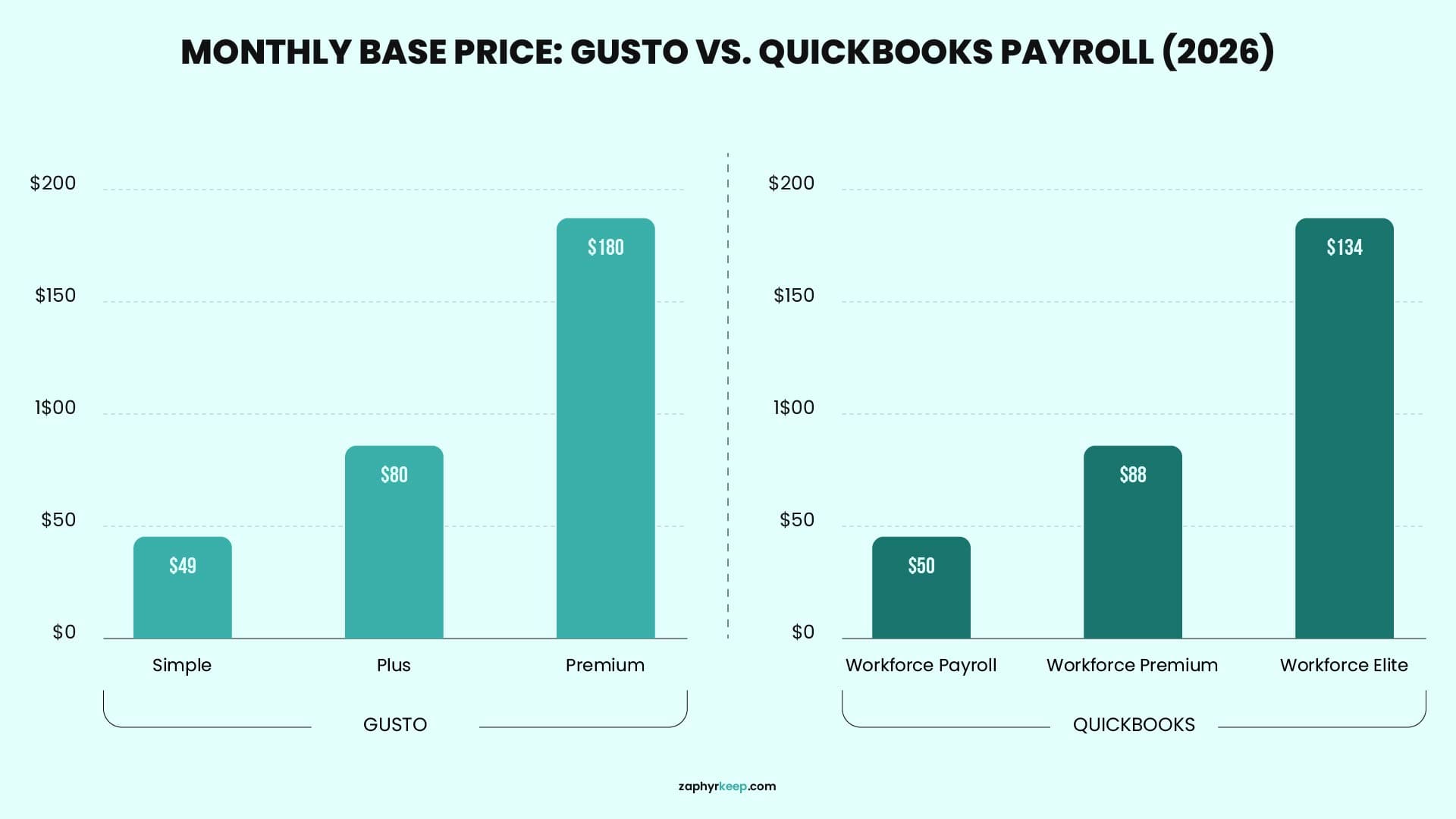
- Gusto Simple starts at $49/month + $6 per employee, while QuickBooks Workforce Payroll starts at $50/month + $7 per employee, so entry pricing is close but not identical.
- QuickBooks Workforce Payroll can be purchased on its own, but it makes the most sense if you also use QuickBooks Online for accounting, since the two are built to work together.
- Gusto includes broader built-in HR tools, including onboarding, PTO policies, and employee management, while QuickBooks adds expanded HR tools, tax penalty protection, and same-day direct deposit at its higher tiers.
- Some business owners outsource payroll and bookkeeping when the time, complexity, or compliance responsibilities become difficult to manage internally.
- Neither platform is objectively “better.” The right choice depends on your existing software stack, your headcount, and how many states you operate in.
What Is Gusto?
Gusto is a payroll platform that has gradually expanded into a more complete HR solution for small businesses. It currently offers four main plans for U.S. employers: Simple, Plus, Premium, and Contractor Only for businesses that exclusively pay 1099 contractors. Each plan includes unlimited payroll runs and automatic federal, state, and local tax filing, which means you can process bonuses, corrections, or additional payroll runs without paying an extra fee each time.
What makes Gusto stand out is how much HR functionality you get alongside payroll. You can manage employee onboarding, PTO policies, organizational charts, and employee self-service from the same platform instead of purchasing separate HR software. As your business grows, the higher-tier plans also provide compliance alerts, enhanced support, and access to dedicated HR advisors, which can be especially helpful when you do not have an in-house HR team.
What Is QuickBooks Payroll?
QuickBooks Payroll, now marketed through Intuit’s QuickBooks Workforce plans, is a payroll solution designed to work especially well with the wider QuickBooks ecosystem. You can purchase payroll on its own or connect it with QuickBooks Online, where paychecks, payroll taxes, and related expenses flow directly into your accounting records without requiring manual exports or repeated data entry.
Its three main tiers are Workforce Payroll, Workforce Premium, and Workforce Elite. The entry plan covers full-service payroll and automatic tax filing, while the higher tiers add features such as same-day direct deposit, time tracking, expanded HR tools, tax penalty protection, and access to an HR advisor. If you already manage your bookkeeping through QuickBooks Online, this native connection can make reconciliation much easier by helping the payroll figures in your books match the money moving through your bank account.
Gusto vs. QuickBooks Payroll: Pricing Breakdown for 2026
Here is how the two compare based on their published 2026 pricing. Both providers regularly offer temporary promotions, so treat these figures as standard starting prices and confirm the latest rates before making your decision.
|
Plan Tier
|
Gusto
|
QuickBooks Workforce
|
|---|---|---|
|
Entry
|
Simple: $49/month + $6 per person
|
Workforce Payroll: $50/month + $7 per employee
|
|
Plus: $80/month + $12 per person
|
Plus: $80/month + $12 per person
|
Workforce Premium: $88/month + $13 per employee
|
|
Top
|
Premium: $180/month + $22 per person
|
Workforce Elite: $134/month + $17 per employee
|
|
Contractors only
|
Contractor Only: $35/month + $6 per contractor
|
No comparable contractor-only plan
|
There are a few important details behind these prices. Gusto Simple supports single-state payroll, so you will generally need to upgrade to Plus when hiring employees in another state. QuickBooks Workforce supports multi-state payroll, although additional state-registration or filing charges may apply depending on your setup.
QuickBooks Workforce Elite has a lower published base price than Gusto Premium, but the plans emphasize different strengths. Elite combines payroll, same-day direct deposit, time tracking, HR support, and tax penalty protection. Gusto Premium focuses more heavily on dedicated service, compliance guidance, employee management, and broader HR support.
Feature Comparison: Tax Filing, Direct Deposit, HR Tools, and Integrations
Tax filing: Gusto handles federal, state, and local payroll-tax filings. QuickBooks officially automates federal and state filings, but local-tax handling varies. Intuit’s general disclosure says local forms may require manual filing, despite some product pages mentioning support for certain local taxes. Use cautious wording here. Elite’s tax penalty protection is correctly stated at up to $25,000 per year, subject to conditions.
Direct deposit speed. Gusto Simple uses standard deposit timing, although next-day pay is available as an add-on. Plus and Premium include next-day payroll. QuickBooks Workforce Payroll includes next-day direct deposit, while Premium and Elite offer same-day payments when payroll is submitted by the required cutoff.
HR tools. Gusto combines payroll with onboarding, PTO management, employee records, time tracking, and broader HR support as you move into higher plans. QuickBooks also provides employee portals and document management, while Premium and Elite add more advanced HR, hiring, and advisory features. Gusto still feels more HR-focused, but the difference is smaller than it once was.
Accounting integration. QuickBooks has the advantage when your bookkeeping already runs through QuickBooks Online because payroll data connects directly with your accounting records. Gusto also integrates with QuickBooks and Xero, giving businesses more flexibility when they use a different accounting platform.
Contractor payments. Gusto lets businesses manage employees and contractors together and also offers a Contractor Only plan. QuickBooks supports 1099 filing within Workforce and provides a separate Contractor Payments plan for businesses that pay independent contractors without running employee payroll.
Gusto vs. QuickBooks Payroll: Which Is Easier to Set Up and Use?
Gusto’s onboarding is largely self-guided, with a step-by-step wizard that walks you through business details, bank connections, and employee information. Most reviewers describe the interface as clean and approachable even for an owner who has never run payroll before.
QuickBooks Payroll’s setup depends heavily on whether you are already inside QuickBooks Online. If you are, adding payroll is closer to flipping on a feature than starting from scratch, since your chart of accounts, vendors, and bank feeds already exist. If you are new to both QuickBooks and payroll at the same time, you are learning two systems at once, which extends the setup timeline.
This is also where accuracy habits matter more than either platform admits upfront. A missed employee update, a state registration that never got filed, or a duplicate deduction can sit quietly in your books for months. It is exactly the kind of discrepancy that surfaces the next time someone sits down to run a bank reconciliation and cannot explain why the cash balance does not match. Whichever payroll software you choose, that monthly matching step is what actually catches the mistake.
How Gusto and QuickBooks Handle Customer Support
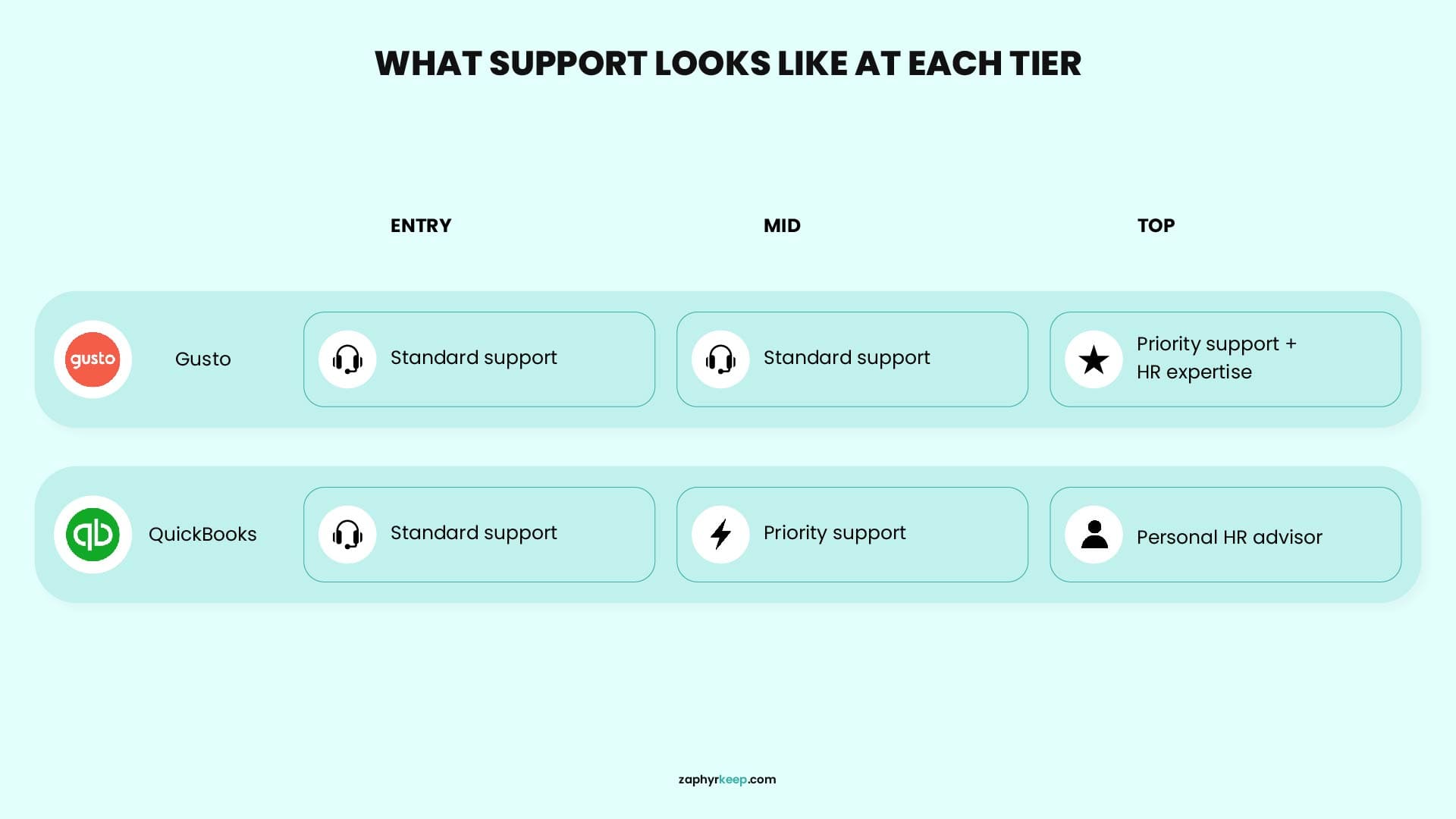
Customer support matters most when payroll is due, a tax notice arrives, or something in the system does not look right. Gusto provides phone and chat support on its lower-tier plans, while premium adds priority assistance, access to HR experts, and a dedicated service advisor.
QuickBooks workforce also offers phone and chat support. Premium includes an expert review of your payroll setup, while elite adds done-for-you setup and access to a personal HR advisor. Keep in mind that an HR advisor helps with matters such as policies, hiring, and compliance, while product-support teams handle technical or payroll-related issues.
Neither provider promises a fixed response time with its standard support. If getting quick, personalized help during payroll week is important to you, compare the support included with each plan instead of looking at price alone.
So, Which Should You Choose in 2026?
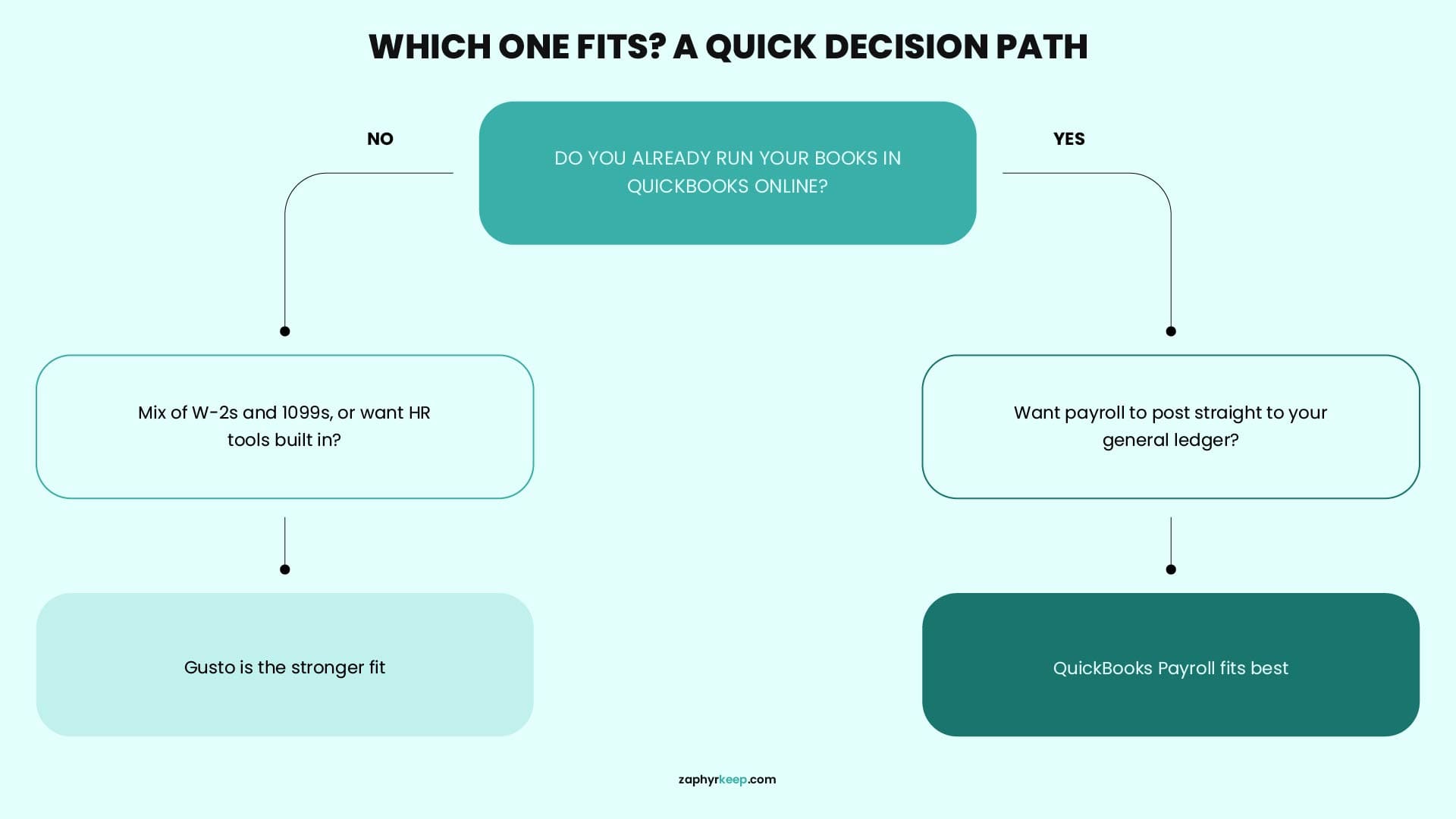
Choose Gusto if:
- You want payroll and HR tools such as onboarding, PTO management, and compliance support available within one platform.
- You pay a mix of W-2 employees and 1099 contractors, or currently work only with contractors.
- You use an accounting platform other than QuickBooks, such as Xero or FreshBooks.
- Employee self-service and a clean payroll experience matter more than native QuickBooks accounting integration.
Choose QuickBooks Payroll if:
- You already manage your books in QuickBooks Online and want payroll expenses to flow directly into your accounting records.
- Same-day direct deposit is important and you are comfortable choosing Premium or Elite.
- You want tax penalty protection included with the Elite plan.
- You prefer managing payroll and accounting within the same QuickBooks ecosystem.
If you are still unsure whether choosing new software is the smartest move, or whether it would be better to hand payroll and bookkeeping to someone else, step back and compare outsourcing your bookkeeping with keeping it in-house before committing to another monthly subscription. For many small-business owners, outsourcing becomes more appealing when payroll and bookkeeping take too much time or create added compliance risk.
Conclusion
Gusto and QuickBooks Payroll both help businesses pay employees accurately and on time, but they are built around different priorities. Gusto combines payroll with a broader set of HR tools, while QuickBooks Payroll connects payroll more closely with the accounting records you already manage.
The better choice depends on your current accounting system, team size, number of operating states, and the level of HR support you need.
Prefer to Hand It Off?
Whichever platform you choose, payroll figures still need to match your bank transactions and accounting records each month. ZaphyrKeep can manage your payroll records, reconciliations, and monthly reporting so you do not have to spend time checking every transaction yourself.
Frequently Asked Questions
Can I move my payroll history from QuickBooks Payroll to Gusto without redoing my tax filings?
Yes, both platforms allow you to export payroll history, employee records, and past tax filings when you switch. You will still need to set up new tax registrations and confirm your quarter-to-date figures with the new provider, since the receiving platform cannot automatically pull historical filings from the one you are leaving.
Does Gusto sync with QuickBooks Online for bookkeeping?
Yes. Gusto offers a direct integration with QuickBooks Online that maps payroll expenses, tax liabilities, and employer contributions to your chart of accounts. It works well for most businesses, though it runs as a sync rather than a native module, so you may need to review the account mapping once during setup.
Which platform is cheaper if I only pay 1099 contractors, not W-2 employees?
Gusto has a clear edge here with its Contractor Only plan at $35/month plus $6 per contractor. QuickBooks Payroll does not offer a comparable contractor-only tier, so businesses paying contractors exclusively typically pay more relative to what they actually need from QuickBooks’ payroll plans.
Is there a free trial for either platform?
Neither Gusto nor QuickBooks Payroll offers a traditional free trial once you connect a bank account and start running live payroll. Both allow you to create an account and explore the setup flow before billing begins, and both run limited-time promotional discounts on new subscriptions throughout the year.
Do either of these platforms handle payroll for a remote team spread across several states without extra setup?
Both support multi‑state payroll, but neither does it for free at every tier. Gusto allows multi‑state on Simple with a per‑state fee (~$12/state/month) and includes it with no per‑state fee on Plus. QuickBooks Payroll supports multi‑state on all plans, but charges per extra state on Core/Premium and includes it only on Elite.
